Import Excel data into SQL Server using copy and paste
ProblemLoading data from SQL Server to Excel is a common practice in many automated and ad-hoc processes completed by DBAs on a daily basis. Traditionally loading data from Excel to SQL Server has been completed by DTS, SSIS, BCP, OPENROWSET, Import\Export Wizard, etc. Unfortunately, for a simple ad-hoc process this can be a time consuming task with a fair amount of clicks and\or coding. With all of the new features with in SQL Server 2005, are any new tricks available to streamline the Excel to SQL Server loading process?
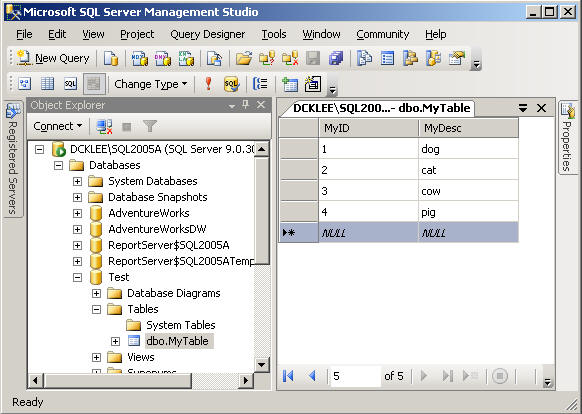
SolutionYes - SQL Server 2005 Management Studio provides the ability to copy and paste columns directly from Excel to SQL Server when the table and column names match up. Let's walk through a simple example. Assume you have a database called 'Test' with a table called 'MyTable' consisting of two columns (MyID, MyDesc). In addition, you have an Excel worksheet where you want to load data directly from Excel to SQL Server. Let's walk through setting up and testing that scenario.
Step 1 - Create the Database and Table
CREATE DATABASE Test
GO
CREATE TABLE [dbo].[MyTable](
[MyID] [int] NOT NULL,
[MyDesc] [varchar](100) NOT NULL)
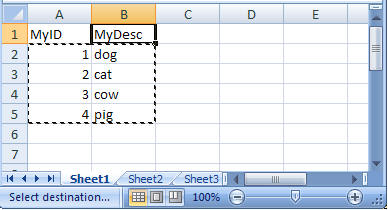
Step 2 - Open the Excel worksheet, select data only and copy the data 'Ctrl +C'
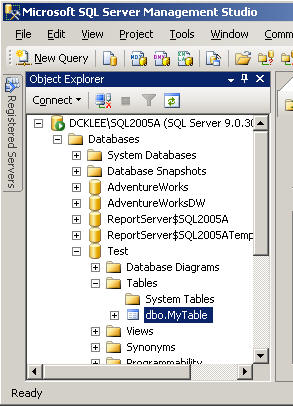
Step 3 - Open SQL Server 2005 Management Studio and navigate to the table
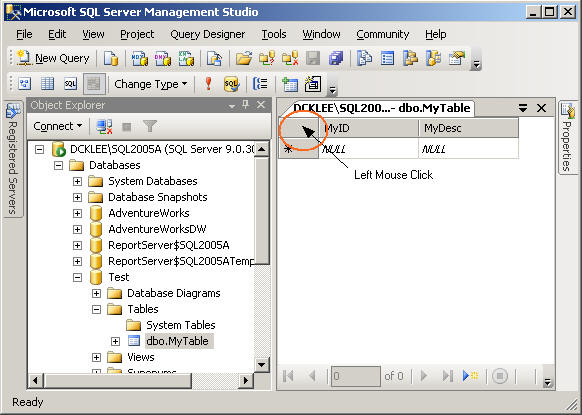
Step 4 - Right click on dbo.MyTable, choose 'Open Table' then left click on below area
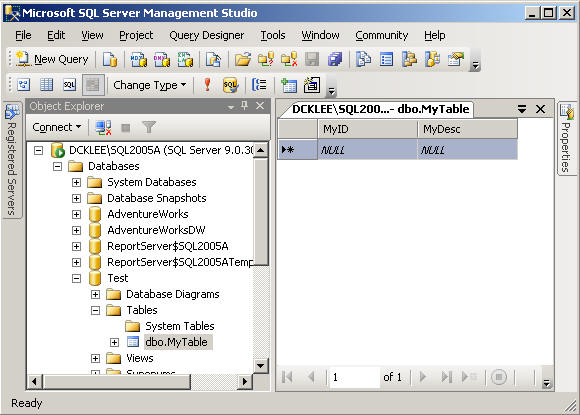
Step 5 - The area below will be highlighted, then right click and choose 'Paste'
Step 6 - Validate the data will be inserted into the table
Sumber :
http://www.mssqltips.com/sqlservertip/1430/import-excel-data-into-sql-server-using-copy-and-paste/


