Ini sangat Membantu untuk memberikan Pembatasan pada Web Report agar hanya bisa READ ONLY jadi tidak Mudah di Insert / Attach
The following describes how to setup a database user with read-only access to the AdventureWorks database.
Using SQL Server Management Studio 2008:
Connect to your database server.
Expand Security > Logins.
Right-click on the user who will be set as having read-only access (in this example "adventureworksro").
Select Properties.
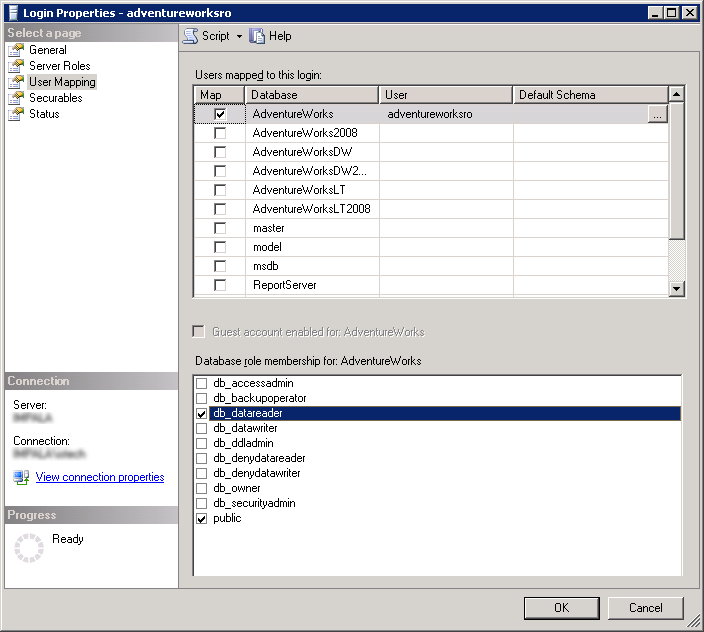
Select User Mapping.
Map the login to the database they will have access to.
Tick the boxes for role membership next to public and db_datareader.
Confirm by clicking OK.
You should get something like the following:
Database-level role names
from
http://msdn.microsoft.com/en-us/library/ms189121(SQL.100).aspxdb_accessadmin
Members of the db_accessadmin fixed database role can add or remove access to the database for Windows logins, Windows groups, and SQL Server logins.
db_backupoperator
Members of the db_backupoperator fixed database role can back up the database.
db_datareader
Members of the db_datareader fixed database role can read all data from all user tables.
db_datawriter
Members of the db_datawriter fixed database role can add, delete, or change data in all user tables.
db_ddladmin
Members of the db_ddladmin fixed database role can run any Data Definition Language (DDL) command in a database.
db_denydatareader
Members of the db_denydatareader fixed database role cannot read any data in the user tables within a database.
db_denydatawriter
Members of the db_denydatawriter fixed database role cannot add, modify, or delete any data in the user tables within a database.
db_owner
Members of the db_owner fixed database role can perform all configuration and maintenance activities on the database, and can also drop the database.
db_securityadmin
Members of the db_securityadmin fixed database role can modify role membership and manage permissions. Adding principals to this role could enable unintended privilege escalation.
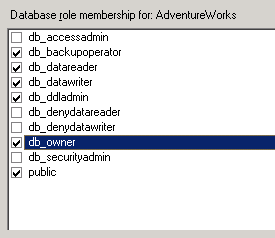
In theory, a user who can do nearly everything but modify access and security permissions:
sumber :
http://www.joellipman.com/articles/microsoft/sql-server/454-create-read-only-database-user-in-sql-server.html

